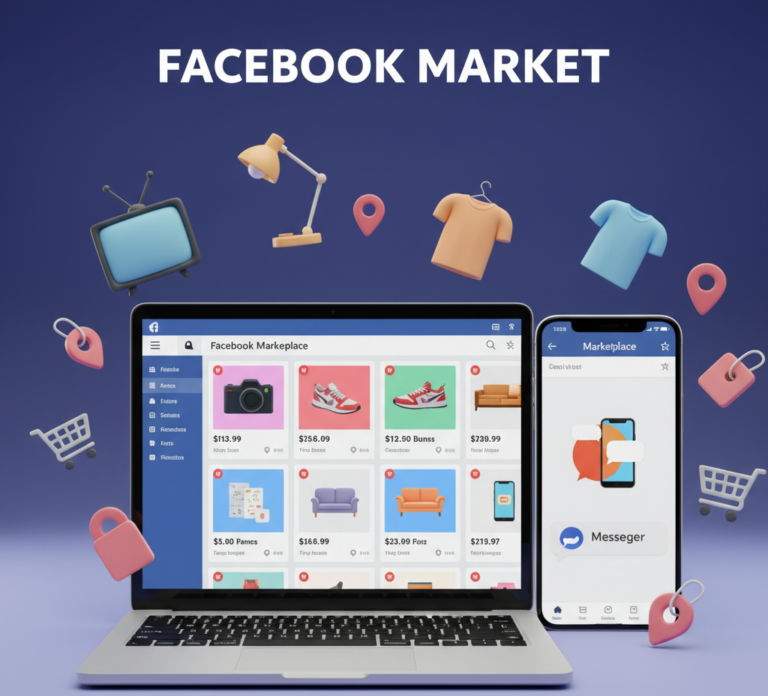
Facebook Market (often referred to as Facebook Marketplace) is one of the most popular platforms for buying and selling goods online. With millions of users worldwide, it provides a convenient, local marketplace for individuals and businesses alike. Whether you want to declutter your home, sell products, or grow a small business, understanding Facebook Market and how to use it effectively can help you reach the right audience and achieve success.
This comprehensive guide explores everything you need to know about Facebook Market, including setup, listing products, safety tips, marketing strategies, and tools to maximize your presence.
What is Facebook Market?
Facebook Market is an online platform integrated within Facebook that allows users to buy and sell items locally or globally. It connects buyers and sellers directly, providing a simple and efficient way to trade goods.
Key features of Facebook Market include:
- Product Listings: Create detailed listings with photos, descriptions, and pricing
- Local Search: Buyers can search for items near their location
- Messenger Integration: Communicate with potential buyers or sellers directly
- Categories: Products are organized into categories like Electronics, Vehicles, Home, and Fashion
Facebook Market is accessible on both mobile devices and desktop, making it convenient for all users.
Why Use Facebook Market?
1. Large User Base
Facebook has billions of active users, making Facebook Market a powerful platform to reach a wide audience.
2. Free to Use
Listing items on Facebook Market is free, which is ideal for small businesses or individuals selling second-hand items.
3. Local Transactions
Buyers can find items near their location, reducing shipping costs and making exchanges easier.
4. Convenient Communication
Integrated Messenger allows seamless conversation with potential buyers or sellers, helping negotiate deals and clarify details.
5. Business Opportunities
Small businesses and entrepreneurs can use Facebook Market to sell products, promote offers, and build a local customer base.
How to Access Facebook Market
1. Mobile App
- Open the Facebook app on your Android or iOS device
- Tap the Marketplace icon at the bottom (iOS) or top (Android)
- Explore items or create a listing
2. Desktop
- Visit www.facebook.com/marketplace
- Browse categories, search for items, or create a new listing
3. Facebook Lite
How to Create a Listing on Facebook Market
1. Add Photos
- Use high-quality, clear images of the product from multiple angles
- Show details and potential flaws honestly
2. Add a Title
- Write a concise, descriptive title that clearly states the product name
3. Add a Description
- Include key details such as condition, brand, size, specifications, and price
- Be honest about any defects to build trust
4. Set a Price
- Research similar listings to set a competitive price
- Consider using Facebook Market’s pricing suggestions
5. Choose a Category
- Select the most relevant category to make your listing easier to find
6. Set Location
- Ensure your location is accurate to attract local buyers
7. Publish Listing
- Review all information and click Publish to make your product live
Tips for Selling on Facebook Market
1. Optimize Your Listings
- Use clear photos and detailed descriptions
- Include keywords buyers might search for
- Highlight unique selling points
2. Engage Promptly
- Respond to inquiries quickly via Messenger
- Be polite and professional to encourage positive responses
3. Promote Listings
- Share your listing on your personal profile or local Facebook groups
- Consider using Facebook Ads to boost visibility for business sales
4. Safety Measures
- Meet in public places for transactions
- Avoid sharing personal information unnecessarily
- Use cashless payment options like PayPal for remote transactions
5. Track Performance
- Monitor views and engagement
- Adjust pricing or description based on feedback and interest
Buying on Facebook Market
1. Searching for Items
- Use keywords and filters for location, price range, and category
- Sort by distance or newest listings
2. Communicating with Sellers
- Use Messenger to ask questions about the item, confirm availability, and negotiate price
- Ask for additional photos if necessary
3. Safety Tips for Buyers
- Meet in public areas with surveillance
- Inspect the item before payment
- Avoid transactions outside Facebook Marketplace when possible
Facebook Market for Businesses
1. Create a Business Presence
- Create a Facebook Page for your brand
- Use Marketplace to list products and connect with local buyers
2. Marketing Strategies
- Use high-quality visuals and engaging descriptions
- Post regularly to maintain visibility
- Leverage Facebook Ads to target specific demographics
3. Promotions and Discounts
- Offer limited-time deals to encourage purchases
- Promote bundle offers to increase sales
4. Customer Engagement
- Respond quickly to questions and messages
- Encourage reviews and ratings to build credibility
- Use Messenger chatbots for automated support
5. Analytics
- Track views, clicks, and messages to optimize product listings
- Monitor popular categories and pricing trends
Common Challenges on Facebook Market
- Scammers and Fraudulent Buyers – Be cautious and verify buyers
- Overpriced Competition – Research similar items to set competitive prices
- Delayed Responses – Respond promptly to maintain interest
- Account Limitations – Ensure your account is in good standing to access Marketplace features
- Shipping Concerns – Clarify logistics and shipping fees if selling remotely
Facebook Market Best Practices
- Take clear, attractive photos for listings
- Be honest in descriptions to build trust
- Respond promptly to potential buyers
- Share listings in local groups for better reach
- Update listings if items sell or prices change
Advantages of Facebook Market
- Wide Reach: Access millions of users
- Local Focus: Buy and sell near your location
- Free Platform: No fees for basic listings
- Integrated Communication: Messenger for smooth negotiations
- Business Growth: Promote small businesses locally and globally
Future of Facebook Market
- Enhanced Shopping Features: Integrated e-commerce and checkout
- AI-Powered Recommendations: Personalized suggestions for buyers
- Expanded Payment Options: Secure online payments and logistics
- Business Tools: Advanced analytics and ad support for sellers
- Global Accessibility: Marketplace expansion to more countries and languages
Conclusion
Facebook Market is more than just a platform for casual buying and selling—it’s a powerful tool for individuals and businesses to reach local and global audiences. From creating attractive listings and engaging with buyers to leveraging tools for business growth, mastering Facebook Market can significantly enhance your social media commerce experience.
Whether you are decluttering your home, selling handmade products, or running a small business, using Facebook Market effectively ensures visibility, credibility, and successful transactions. With proper safety measures, marketing strategies, and consistent engagement, Facebook Market can become an essential part of your online buying and selling journey.