Table of Contents
- Introduction
- What Are Canonical Tags?
- How Canonical Tags Work in HTML and SEO
- When Should You Use Canonical Tags? Common Scenarios
- Canonical Tags vs 301 Redirects vs Noindex: Key Differences
- Best Practices for Implementing Canonical Tags in 2026
- How to Add and Check Canonical Tags on Your Website
- Practical Tips and Benefits of Using Canonical Tags
- Common Mistakes to Avoid with Canonical Tags
- Frequently Asked Questions (FAQ)
- Conclusion
Introduction
Ever noticed the same content appearing under multiple URLs on your site? Maybe it’s your homepage with and without “www,” or product pages with sorting parameters. Google might pick the wrong version to show in search results, splitting your hard-earned ranking power.
That’s where canonical tags come in. These simple HTML snippets act like a polite note to search engines saying, “This is the main version—please focus here.”
If you’re wondering how canonical tags can clean up duplicate content issues and strengthen your SEO, you’re in the right place. In 2026, with AI overviews and stricter quality signals, getting canonicalization right remains a foundational technical SEO practice.
This guide explains everything in plain language—no confusing code unless you need it. You’ll learn when to use them, how to implement them properly, and real tips to avoid common pitfalls. Let’s make your site easier for Google to understand.
What Are Canonical Tags?
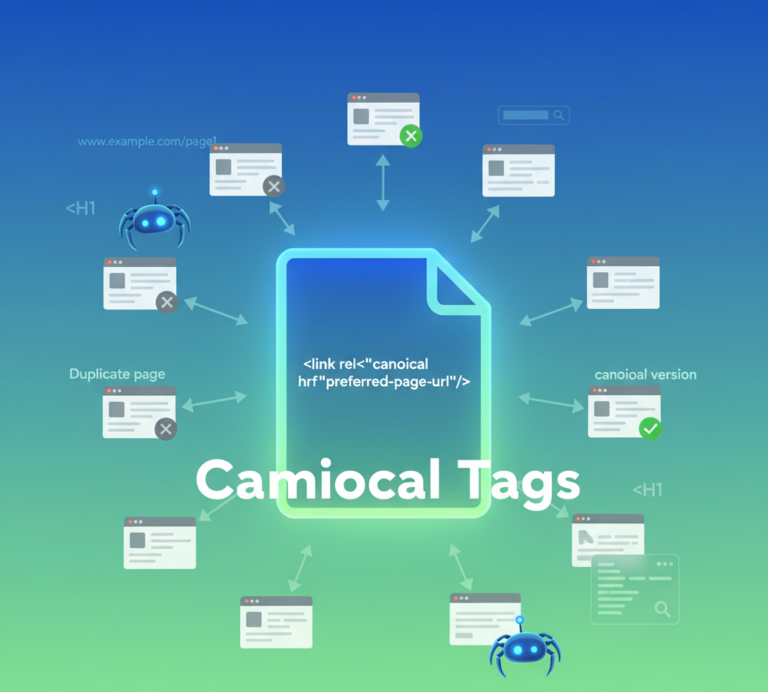
Canonical tags, also known as rel=”canonical”, are HTML elements that tell search engines which URL represents the preferred or “master” version of a page when similar or identical content exists on multiple URLs.
In simple terms, they help consolidate ranking signals so all the SEO value flows to one primary page instead of getting diluted across duplicates.
The tag looks like this in your page’s code:
HTML
<link rel="canonical" href="https://www.example.com/preferred-page/" />This line sits in the <head> section and points to the URL you want Google to index and rank. Canonical tags don’t hide pages or redirect users—they just guide crawlers on which version matters most.
Even if your site seems duplicate-free, adding self-referencing canonical tags is now considered a smart best practice.
LSI keywords like duplicate content issues, canonicalization in SEO, preferred URL, rel=canonical, and technical SEO signals frequently appear in discussions about this topic because they all revolve around helping search engines understand your site structure.
How Canonical Tags Work in HTML and SEO
Search engines crawl the web by following links, but many sites unintentionally create multiple versions of the same content through parameters, session IDs, or printer-friendly views. Without clear guidance, Google has to guess which one to prioritize.
When you add a canonical tag, you give a strong hint. Google usually respects it, especially when the content is very similar. The chosen canonical URL gets the indexing focus, while others are treated as alternatives.
In 2026, canonical tags still play a key role alongside other signals like internal links and content quality. They help with crawl efficiency by reducing wasted effort on near-duplicates.
Here’s a quick example:
You place a canonical tag on URL B pointing to URL A. Google understands URL A is the main one.
When Should You Use Canonical Tags? Common Scenarios
Canonical tags shine in several everyday situations:
- URL variations: www vs non-www, http vs https, or trailing slashes.
- Parameter URLs: Sorting, filtering, or tracking parameters (?utm_source, ?sessionid).
- Product variations: Same item in different colors or sizes with near-identical descriptions.
- Pagination: Individual paginated pages should self-reference (not point to page 1).
- Syndicated or reprinted content: Point back to your original article.
- Homepage duplicates: Different ways to reach the homepage.
Numbered list of common use cases:
- E-commerce sites with faceted navigation.
- Blogs with archive or category pages that overlap.
- Sites using multiple CMS templates for the same content.
- International or mobile versions that are very similar.
Only use canonical tags when pages are truly similar. If content differs significantly, treat them as unique pages with self-referencing canonicals.
Canonical Tags vs 301 Redirects vs Noindex: Key Differences
People often mix these up, but each solves a different problem.
- Canonical Tags: A hint for duplicate or similar content. Users can still access all versions; signals consolidate to the preferred URL.
- 301 Redirects: A permanent move. Users and crawlers are sent to the new URL. Best when the old page should no longer exist independently.
- Noindex: Prevents a page from appearing in search results but keeps it crawlable. Useful for thin or internal-only pages.
Quick comparison in bullet points:
- User experience: Canonical keeps all URLs accessible; 301 changes the URL; noindex hides from SERPs.
- SEO value: Canonical passes signals; 301 passes most equity; noindex does not.
- Strength of signal: 301 is strongest; canonical is a hint (Google may sometimes override).
Choose based on whether you want users to see the alternate versions. Canonical tags offer flexibility without breaking links or user journeys.
Best Practices for Implementing Canonical Tags in 2026
Follow these rules to avoid issues:
- Use absolute URLs (full https://www.example.com/…), never relative.
- Place only one canonical tag per page in the <head> section.
- Add self-referencing canonicals on every indexable page—even if no duplicates exist.
- Ensure the canonical target is live, returns 200 status, and is not blocked by robots.txt or marked noindex.
- Keep the canonical version complete and high-quality.
- Use lowercase consistently and avoid unnecessary parameters.
For large sites, implement dynamically through your CMS (WordPress plugins like Yoast or Rank Math handle this well). Always test after changes.
Important sentence: Self-referencing canonical tags on every page prevent Google from making wrong assumptions about your preferred URLs.
How to Add and Check Canonical Tags on Your Website
Adding them depends on your platform:
- WordPress: Use SEO plugins—they often add self-referencing automatically.
- Shopify or other CMS: Check built-in settings or edit theme code.
- Custom sites: Manually add the <link rel=”canonical”> tag in the head.
To verify:
- View page source and search for “canonical”.
- Use Google Search Console URL Inspection tool—it shows “User-declared canonical” and “Google-selected canonical”.
- Tools like Screaming Frog or Sitebulb can audit site-wide.
If Google chooses a different canonical, investigate mismatches in content, links, or redirects.
Practical Tips and Benefits of Using Canonical Tags
Tips for better results:
- Audit regularly using Google Search Console’s “Duplicate without user-selected canonical” or “Alternate page with proper canonical tag” reports.
- Combine with strong internal linking to reinforce your preferred URLs.
- For paginated content, let each page self-reference.
- Monitor after major site changes like migrations or redesigns.
Key benefits:
- Consolidates ranking power so one strong page benefits instead of many weak ones.
- Improves crawl budget by guiding bots to valuable content.
- Reduces duplicate content risks that can dilute authority.
- Enhances indexing accuracy in complex sites like e-commerce or news portals.
- Supports better user experience while keeping technical signals clean.
In 2026, clean canonicalization also helps with generative AI results by giving clear signals about your primary content.
Common Mistakes to Avoid with Canonical Tags
Even experienced site owners run into these:
- Pointing to non-existent or 404 pages.
- Using multiple conflicting canonical tags on one page.
- Relative instead of absolute URLs.
- Canonical chains (A points to B, B points to C).
- Blocking the canonical URL in robots.txt.
- Applying canonicals to very different content.
Fix these by double-checking implementation and using Search Console reports.
Frequently Asked Questions (FAQ)
What is a canonical tag in simple terms? It’s an HTML tag that tells search engines which URL is the preferred version when similar content exists on multiple addresses.
Do I need canonical tags if my site has no duplicates? Yes—self-referencing canonicals are recommended as a best practice to prevent future issues.
Can Google ignore my canonical tags? Yes, they are strong hints, not strict commands. Google may choose differently if content or other signals suggest otherwise.
Should I use canonical or 301 redirect? Use canonical when alternate URLs should remain accessible. Use 301 when the old URL should permanently redirect.
How do I fix “Google chose a different canonical” in Search Console? Check content similarity, ensure absolute URLs, and add consistent self-referencing tags.
Do canonical tags affect page speed or user experience? No—they are invisible to visitors and add almost no load time.
Conclusion
Canonical tags might seem like a small technical detail, but they play a big role in keeping your SEO house in order. By clearly telling search engines which version of your content to prioritize, you avoid diluted rankings, wasted crawl budget, and confusing signals.
Take a few minutes today to check your important pages. Add self-referencing canonicals where missing, fix any conflicts, and monitor results in Google Search Console. Combined with great content and solid site structure, proper canonicalization helps your best pages shine.
Small technical wins like this add up to better visibility over time. Your site—and your traffic—will thank you.
Have you run into canonical issues on your website? Share your experience or questions in the comments—I’m happy to help clarify!