Are you a small business owner wondering why your shop, restaurant, or service doesn’t show up when customers search nearby? If you typed “google my bussiness” into Google and landed here, you’re in the right spot. Google My Business (now officially called Google Business Profile) is still the most powerful free tool for local visibility. In this complete guide, we’ll break everything down in plain English—no tech jargon—so you can claim your spot on Google Search and Maps, attract more customers, and grow your business without spending a fortune on ads.
Whether you run a bakery in Multan, a plumbing service in Lahore, or a salon anywhere in Pakistan, a strong Google My Business profile puts you in front of people ready to buy right now. Let’s dive in.
Table of Contents
- What Is Google My Bussiness?
- Why Google My Bussiness Still Matters in 2026
- How to Set Up Your Google My Bussiness Profile – Step-by-Step
- Verification Made Simple
- Pro Tips to Optimize Your Google My Bussiness
- Real Benefits of a Well-Managed Google My Bussiness
- Common Mistakes to Avoid
- Frequently Asked Questions (FAQ)
- Conclusion: Start Today and Watch Your Local Traffic Grow
What Is Google My Bussiness?
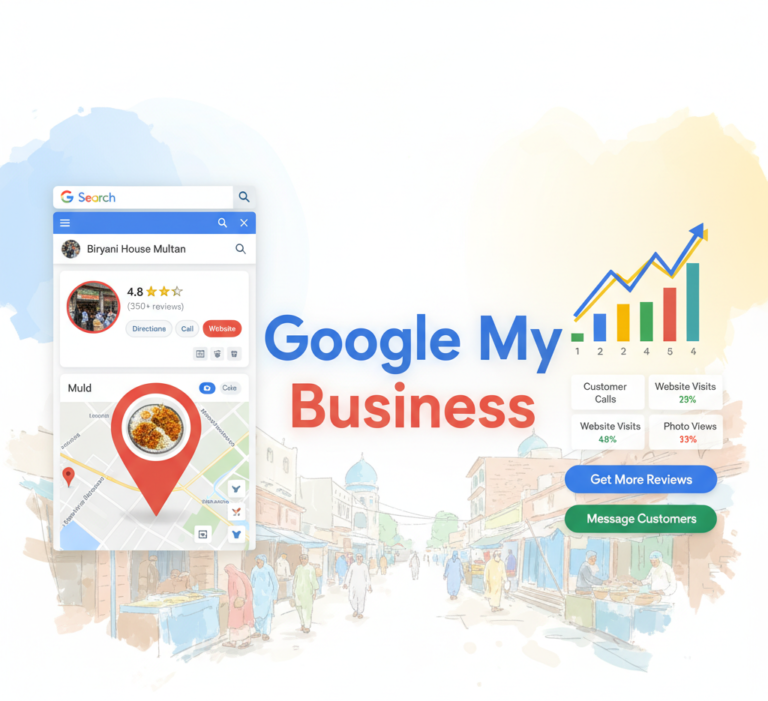
Google My Bussiness (often searched as “google my bussiness” because of the common spelling mix-up) is Google’s free tool that lets you manage how your business appears on Google Search, Google Maps, and even the Local Pack (those top three results that show up with maps).
Originally launched as Google My Business in 2014, Google rebranded it to Google Business Profile in 2021. But most people—and many guides—still call it Google My Bussiness because the name stuck. It works like a digital storefront: you add your name, address, phone number (NAP), hours, photos, services, and more. Customers see this info instantly when they search “coffee near me” or “plumber in Multan.”
In simple terms, it connects your real-world business to the online world where 76% of local searches lead to an in-store visit within 24 hours.
Why Google My Bussiness Still Matters in 2026
Local search isn’t going anywhere—in fact, it’s getting bigger. With AI Overviews and smarter Maps results, Google now rewards businesses that keep their profiles fresh and complete.
A well-optimized Google My Bussiness profile can make you stand out even when competitors are spending big on ads. It drives direct actions: calls, directions, website clicks, and messages. Plus, with rising mobile searches in Pakistan and around the world, your listing appears right where customers are looking.
In 2026, Google uses AI to scan profiles, reviews, and photos faster than ever. Profiles that post regularly, reply to reviews, and add fresh images get pushed higher in results. If you ignore it, you’re basically handing customers to your competitors.
How to Set Up Your Google My Bussiness Profile – Step-by-Step
Setting up takes less than 30 minutes if you follow these steps:
- Go to the official site – Head to business.google.com and sign in with your Google account (use your business email if possible).
- Search for your business – Google will suggest existing listings. If yours shows up, claim it. If not, click “Add your business.”
- Enter basic details – Put your exact business name, address, phone, website, and category. Choose the primary category carefully—it’s the most important one!
- Add hours, services, and description – Be accurate. Write a friendly 750-character description with natural keywords like “best biryani in Multan” only if it truly fits.
- Upload photos – Add at least 5–10 high-quality images right away (logo, storefront, inside shots, team).
- Publish and verify – Google will ask you to verify ownership (more on this next).
Pro tip: Double-check every detail matches your website and Facebook page. Inconsistent NAP info confuses Google and hurts rankings.
Verification Made Simple
Verification proves you own the business. Google offers several methods in 2026:
- Phone or email – Fastest for many businesses.
- Postcard – Mailed to your address (takes 5–14 days).
- Video verification – Record a short video showing your storefront and operations (great for service businesses).
- Live video call – Talk to a Google rep in real time.
Most businesses get verified within minutes using phone or video. Once done, you unlock full editing power.
Pro Tips to Optimize Your Google My Bussiness
Here’s how to turn a basic listing into a customer magnet:
- Keep it 100% complete – Fill every section: attributes (wheelchair accessible, Wi-Fi, etc.), services, products, and Q&A.
- Post updates weekly – Share offers, events, new menu items, or behind-the-scenes photos. These appear in search results.
- Add fresh photos and videos – Google loves visuals. Upload 3–5 new ones every week. Geo-tag them if possible.
- Respond to every review – Thank positive ones, address negative ones professionally within 24 hours.
- Use keywords naturally – In description and posts, but never stuff them.
- Monitor Insights – See what searches bring people to you and adjust accordingly.
- Add products or menu items – Restaurants and shops see huge engagement here.
- Encourage reviews – Ask happy customers via WhatsApp or after service.
Consistent activity signals to Google that your business is active and trustworthy.
Real Benefits of a Well-Managed Google My Bussiness
Businesses with strong profiles enjoy:
- More foot traffic – Customers see your hours, photos, and reviews before they even leave home.
- Higher local rankings – Better chance to appear in the Local Pack.
- Free marketing – Posts and photos keep your business top-of-mind.
- Builds trust – Reviews act as social proof.
- Direct leads – One-click calls, directions, or website visits.
- Analytics insights – Track views, actions, and search terms.
Many owners report 2–7x more clicks and calls after optimizing.
Common Mistakes to Avoid
- Using keyword-stuffed business names (Google cracks down hard).
- Inaccurate hours or address.
- Ignoring negative reviews.
- Never posting updates.
- Choosing wrong categories (Google’s AI now flags misuse).
- Forgetting to update after moving or changing hours.
Fix these and you’ll avoid penalties or suspensions.
Frequently Asked Questions (FAQ)
Q: Is Google My Bussiness still free in 2026? A: Yes! It’s completely free.
Q: What’s the difference between Google My Bussiness and Google Business Profile? A: Same thing—just a name change. Most people still search “google my bussiness.”
Q: How long does verification take? A: Phone/email is instant. Postcard or video can take a few days.
Q: Can I have multiple locations? A: Yes, create separate profiles for each.
Q: Do reviews still matter? A: Absolutely. Quality and recent reviews are more important than ever.
Q: What if my profile gets suspended? A: Follow guidelines strictly and appeal through the dashboard.
Conclusion: Start Today and Watch Your Local Traffic Grow
Google My Bussiness isn’t just another online profile—it’s your 24/7 local salesperson. By claiming, verifying, and optimizing it, you give your business a massive edge in 2026’s competitive market.
Don’t wait for customers to find you by accident. Take 30 minutes today to set it up or update your existing one. Post regularly, engage with reviews, and watch your calls, visits, and sales increase.
Ready to dominate local search? Head to business.google.com right now. Your next customer is already searching for you.
Small changes to your Google My Bussiness profile can deliver big results—start simple and stay consistent.